
---
title: Zendesk Integration | OnSIP
description: Integrate Zendesk with OnSIP to streamline customer support workflows with embedded calling, screen pops, and click-to-call functionality.
---

[![logo-onsip_blue](https://info.onsip.com/hs-fs/hubfs/logo-onsip_blue.png?width=128&name=logo-onsip_blue.png "logo-onsip_blue")](https://www.onsip.com)

# Zendesk Integration

Empower your sales and customer service agents to work more efficiently with OnSIP’s Zendesk Integration!

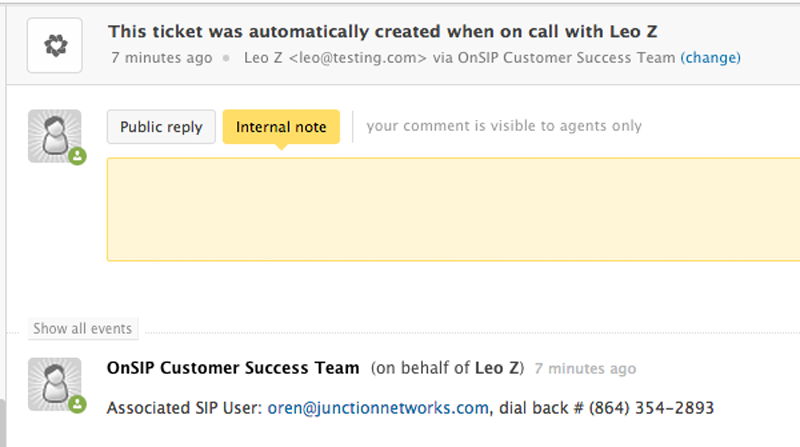
When an agent answers a call, a new ticket is instantly created right within the agent’s Zendesk interface. The ticket automatically is:

With these key call details promptly logged in the Zendesk ticket, the agent can quickly address the caller's questions or troubleshooting requests. And after completing a few post-call tasks in the ticket, your agent can close it out and be ready to take the next call in the queue.
![zendesk_integration_page_automatic_ticket_1-1](https://info.onsip.com/hubfs/zendesk_integration_page_automatic_ticket_1-1.png "zendesk_integration_page_automatic_ticket_1-1")

### We're sorry--it looks like you are located in a country that OnSIP doesn't service. If you are located in the U.S. and you received this message, please contact us at (800) 801-3381.

```json
{
  "@context" : "https://schema.org",
  "@type" : "WebPage",
  "description" : "Integrate Zendesk with OnSIP to streamline customer support workflows with embedded calling, screen pops, and click-to-call functionality.",
  "name" : "Zendesk Integration for OnSIP",
  "publisher" : {
    "@type" : "Organization",
    "logo" : {
      "@type" : "ImageObject",
      "url" : "https://www.ooma.com/wp-content/uploads/ooma-logo.png"
    },
    "name" : "Ooma",
    "url" : "https://www.ooma.com/"
  },
  "url" : "https://info.onsip.com/zendesk"
}
```